7 min read
cat-pixel-generator

How to Make a Pixel Cat Avatar for Discord and Twitch

A pixel cat avatar guide: use a cat pixel art generator to build a clean 8-bit cat icon that stays sharp at 32px, then export a PNG.

Cats are an internet staple, and their simple features translate naturally into pixel art. A good pixel cat reads instantly: two ears, two eyes, a tiny nose, done. This guide walks through making one with a cat pixel art generator so it still looks sharp when Discord or Twitch shrinks it to avatar size.

Pixel cat avatar generator guide

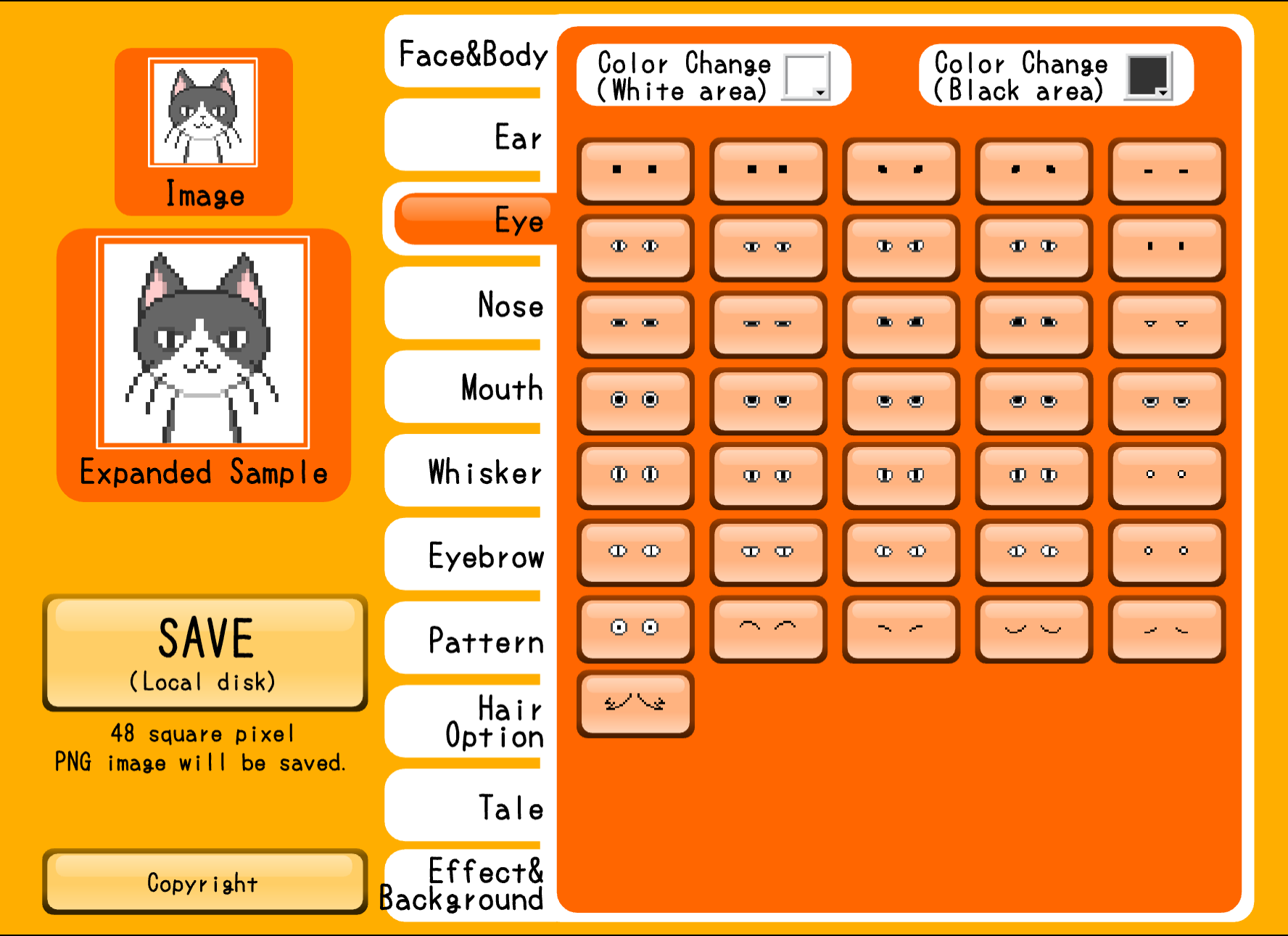
You do not need to draw pixel by pixel. The editor lets you click through coat colors, facial features, expressions, and accessories, then download the finished cat as a transparent PNG.

What is a pixel cat avatar?

A pixel cat avatar is a profile picture of a cat drawn in a deliberately low-resolution style. Its ears, eyes, markings, and whiskers are built from visible square shapes rather than smooth curves, giving it the blocky look associated with 8-bit and 16-bit games. Because the detail is intentionally limited, the image survives heavy downscaling: platforms such as Discord, Twitch, and Steam compress and crop avatars, while a strong pixel-cat silhouette stays recognizable. It is the same visual idea as a classic game sprite, cropped to a face and used as a profile picture.

Why do cat faces work so well at tiny sizes?

Cat faces are built from shapes that survive shrinking. Triangular ears break the outline of the head, so even at 24 or 32 pixels a viewer sees “cat” before noticing the smaller details. A human pixel face may need several tiny changes around the mouth or eyebrows to communicate an expression. A cat can work with much less: dot eyes, a small nose, and a pair of pointed ears.

That makes a cat a friendly first avatar subject. Even if a marking or accessory becomes hard to see at small size, the silhouette still carries the design. The goal is not to preserve every detail. It is to make the ears, eyes, and main coat pattern easy to recognize at a glance.

How do you make a pixel cat avatar step by step?

1) Launch the editor and choose a base cat

Open the generator and click START. Begin with the base coat or preset that is closest to the cat you want. Focus on the overall silhouette first: clear ears, an uncluttered head shape, and enough open space around the face to survive a circular crop.

2) Pick eyes and an expression that read small

Browse the eye and expression options before adding accessories. Wider-set eyes usually feel softer and remain easier to read in a tiny member list. If two choices look similar at full size, prefer the simpler one; subtle differences often disappear once the avatar is reduced.

3) Add one recognizable marking

A tuxedo muzzle, a tabby stripe, or a contrasting inner ear can give the cat character without making it noisy. Choose one main marking and let it do the work. Whiskers and small accessories can be fun, but treat them as optional details rather than the part that identifies the cat.

4) Keep the coat palette focused

Choose a main coat color, a darker shade for contrast, and one or two accents for the eyes, nose, or accessory. A small palette makes the separate parts feel like one design. If the editor offers several similar shades, use only the ones that create a visible light-dark difference.

5) Download the PNG and check it small

Preview the finished cat, download the transparent PNG, and view it at roughly 32px. If the ears, eyes, and coat pattern still read, the avatar is ready. If the face looks crowded, return to the editor and remove an accessory or choose a simpler marking instead of adding more detail.

What color palette suits a pixel cat?

Four or five visual colors are usually enough: one coat color, one darker shade, one lighter highlight, an eye color, and perhaps pink for the nose or inner ears. That is enough variety for a convincing cat without making the icon busy.

Warm coats such as ginger, cream, and brown tabby feel friendly and casual, which suits a personal Discord account or cozy-gaming community. Cool gray and black-and-white combinations look more restrained and work well with minimalist channel branding. Whatever you choose, make the eyes contrast with the coat. Green or amber eyes on a dark cat, or blue eyes against warm fur, create a focal point that remains visible after compression.

For a matching team or server set, keep the expression, accessory style, and background treatment consistent, then vary the coat color for each person. The repeated structure makes the avatars feel related while each member still gets an individual cat.

Where do pixel cat avatars get used?

  • Discord profiles and server icons. A cat silhouette is easy to recognize in a compact member list or circular server badge.
  • Twitch and stream branding. A streamer can use the same cat concept for a channel avatar, panels, badges, or social profiles.
  • Steam and game forums. The retro style sits naturally beside indie games, pixel-art screenshots, and sprite-based communities.
  • Group projects and game-jam teams. A shared expression or palette with different coat colors gives a small team a quick visual identity.

What mistakes make a pixel cat look “off”?

The most common problem is too many competing colors. Several close shades may look rich in the large preview but merge into a muddy patch at avatar size. Keep the palette small and make each color serve a clear purpose.

The second problem is stacking too many markings and accessories. Glasses, a hat, whiskers, stripes, and a patterned background may all be appealing separately, but together they can hide the face. Keep the ears and eyes visually dominant.

The third is ignoring the circular crop used by many platforms. Leave breathing room above the ears and around the cheeks, then check the exported image in the destination platform's preview before saving the change.

Mini FAQ

Q: What size should I make a pixel cat avatar?

A: Use the full PNG exported by the generator, then preview how it looks at about 32px. The important test is legibility at the displayed size, not manually rebuilding the artwork on a 32x32 canvas.

Q: Can I make a matching cat for every person in my server?

A: Yes. Reuse the same expression, accessory, and background choices, then change the coat color or one marking for each member.

Q: My cat looks angry. What should I change?

A: Try a wider or rounder eye option and a simpler brow or mouth. A lighter muzzle or inner-ear accent can also soften the expression without adding clutter.

Wrap-up

A pixel cat is a forgiving first avatar: the silhouette is recognizable, the palette can stay small, and the design works well at compact sizes. Choose a clear base cat, make the eyes the focal point, add one memorable marking, and test the finished PNG at 32px.

Build one with the cat pixel art generator. If you would rather put a human face on your profile in a related blocky style, the square face icon maker offers a similar pick-and-customize workflow.

🎨

Ready to create your avatar?

Turn your ideas into unique cartoon icons in minutes.

Start Creating Your Avatar →

Related Articles

View All Articles →