Gaming Avatar Picking Guide: Choose a Gaming Avatar People Remember
gaming avatar made simple: pick a style by game/community, then generate a clear icon fast.
Read →Design retro 8-bit and 16-bit avatars with our free pixel art generator. No signup, no downloads — create your pixel pfp and export as PNG instantly.
CLICK TO START
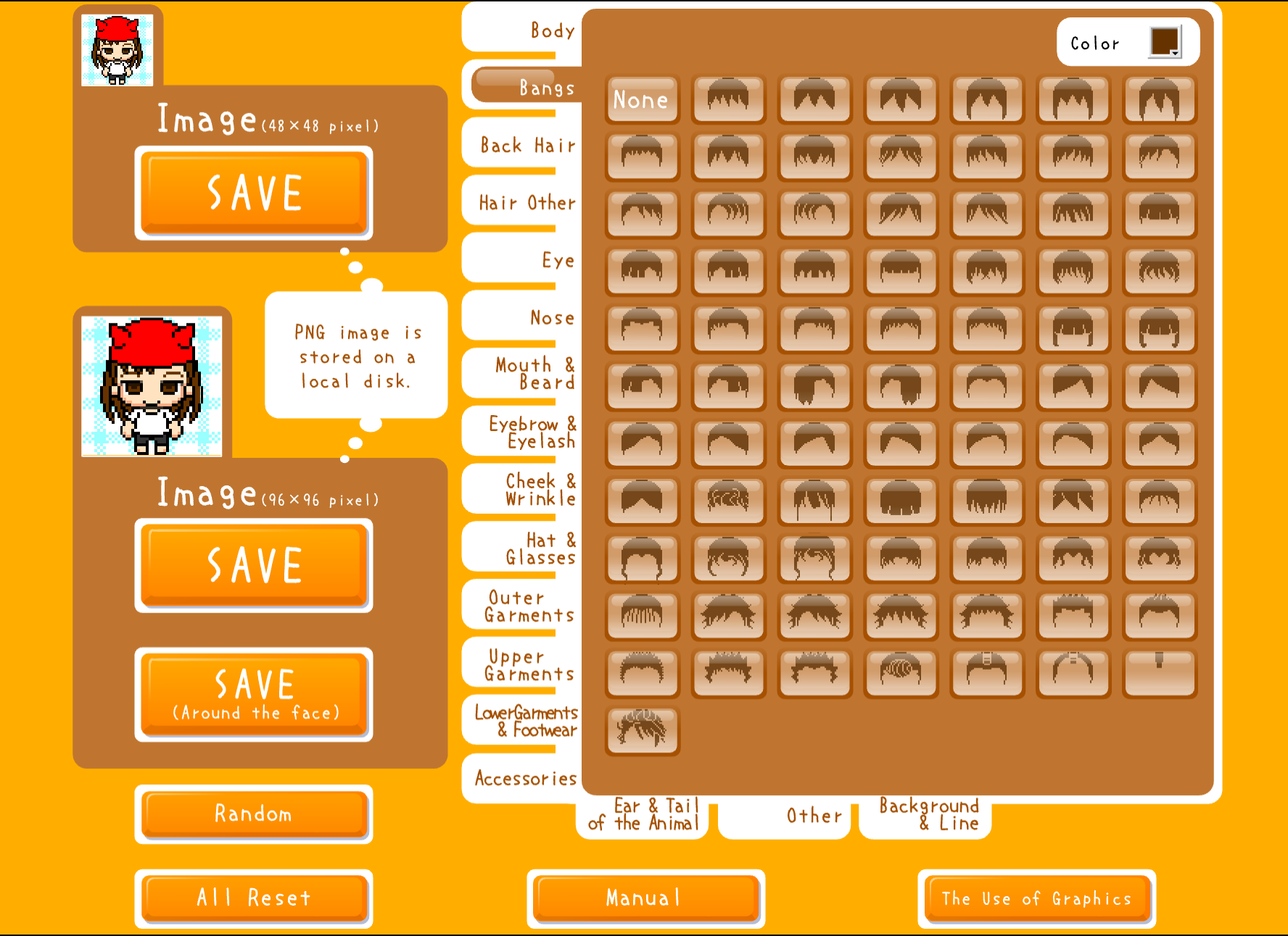
This pixel art generator lets you build a custom 8-bit or 16-bit avatar from scratch — no prompt, no guesswork, just a hands-on pixel art editor that runs right in your browser. Pick your face shape, choose a color palette, stack on accessories, and download your retro pixel avatar as a transparent PNG in minutes. No account, no signup, no plugins.
This tool is a preserved Flash classic from the Flashpoint archive, brought back to life through Ruffle — an open-source Flash emulator that runs natively in modern browsers. If you remember the early 2000s flash museum era of browser-based character creators, this is that experience, fully intact and working today.
Pixel art avatars have a distinct aesthetic that stands out in any feed or server. Whether you're a gamer, a streamer, or just someone who loves the retro pixel look, a pixel art generator like this one lets you craft something more personal than an AI-generated image and more distinctive than a photo crop.
This pixel art generator is completely free — no registration, no watermarks, no limits on downloads
The pixel art generator supports classic NES-era 8-bit or more detailed 16-bit aesthetics for your retro avatar
Exports from our pixel art generator work perfectly for Discord pfp, Twitch profile, Steam, and other gaming platforms
Transparent background PNG ready the moment you finish — no email, no waiting
Open the pixel art generator in any mobile browser and build your avatar on a phone or tablet
Original Flashpoint-era tool running via Ruffle — authentic retro creator, browser-native
A pixel art pfp stands out in Discord servers, especially in gaming and tech communities where the retro aesthetic is universally appreciated. Use this pixel art generator to create a transparent PNG that works perfectly with Discord's avatar uploader — the blocky style stays sharp at small display sizes.
Pixel avatars are a natural fit for Twitch streamers — the retro gaming look resonates with audiences who grew up on 8-bit consoles. Use our pixel art generator to create your channel avatar, then place it inside an offline banner or social media pfp for consistent branding.
Level up your Steam, Xbox, PlayStation, or Nintendo profile with a custom pixel avatar. The pixelated style fits gaming platforms naturally, and a hand-built icon shows more personality than a screenshot or box art crop.
Stand out in subreddits and forum threads with a distinctive pixel art avatar. A recognizable icon makes your comments easier to spot and helps build community reputation over time.
Use a pixel art avatar on Twitter/X, Instagram, TikTok, or any platform for a unique, retro-flavored online identity. Pixel icons are eye-catching in busy timelines and tend to get noticed — especially if everyone else is using photos.
For gaming or tech channels, pixel art branding signals authenticity to your audience. A consistent 8-bit avatar across YouTube, Discord, and Twitter ties your brand together without needing a professional designer.
Click START to open the editor — it loads automatically via Ruffle
Set the base aesthetic for your character before customizing
Build out every detail of your retro pixel character
Check how the avatar looks before downloading
Save your finished pixel art avatar as a transparent PNG
A pixel art avatar is a profile picture designed in the style of classic 8-bit or 16-bit video games, where each pixel is deliberately placed to create a blocky, nostalgic look. These retro pixel icons are popular on Discord, Twitch, and gaming platforms because they fit the gaming aesthetic and stay crisp at small display sizes.
Click START on this page to open the pixel art generator. Use the editor to customize your character — face shape, skin tone, hair, eyes, accessories — then click download to save your pixel avatar as a PNG. No account or signup required.
Yes, completely free. No hidden costs, no premium tier, no watermarks on downloads. Create as many 8-bit avatars as you want and download them all at no charge.
8-bit pixel art uses a limited color palette (typically 256 colors) with larger, more visible pixels — the classic NES or Game Boy look. 16-bit style allows more colors and finer detail, closer to SNES or Sega Genesis era graphics. Both styles are available in this pixel art generator.
AI generators produce images from text prompts — you describe what you want and the AI interprets it. This tool is an interactive editor: you pick every feature yourself, so the result is exactly what you designed. It's more like a digital character sheet than a generative model.
This is a preserved Flash classic from the Flashpoint archive. Adobe Flash was discontinued in 2020, but Ruffle — an open-source Flash emulator — brings it back in any modern browser without plugins. It's part of the broader flash museum preservation effort to keep classic web tools alive.
Yes. The PNG export works directly with Discord's avatar uploader. The retro pixel art style also looks particularly good in gaming server member lists, where it stands out from photo avatars.
Yes. The pixel art generator runs via Ruffle in mobile browsers. Open the page on your phone or tablet, tap START, and you're in the editor — no app download needed.
Yes. Any avatar you create with this pixel art generator is yours to use however you like — personal profiles, streaming channels, gaming content, or commercial projects.
Try refreshing the page first. If it still won't load, check that your browser is up to date (Ruffle needs a recent browser version). Script-blocking extensions or aggressive ad blockers can sometimes prevent the Ruffle loader from running — try disabling them for this page.
gaming avatar made simple: pick a style by game/community, then generate a clear icon fast.
Read →Pixel avatar generator: make a free 8-bit icon fast with Pixel Art Icon Generator, export PNG.
Read →Compare pixel art and square face styles to pick the right look for your brand or profile.
Read →Design a retro pixel avatar in seconds — free, no signup required.
Start Creating