The safest Discord avatar size is a square image of 512 by 512 pixels, saved as PNG and well under 8 MB, the limit Discord gives for server avatars. Discord does not publish one required size for profile pictures, but its own pages give enough to work with: a minimum, the file types it accepts, a size limit, and the sizes it can show your avatar at.
This guide covers what Discord says, why 512 is a good number, and how to keep the picture readable once Discord crops it to a circle.
What Size Is a Discord Avatar?
Discord accepts any square image above a small minimum and serves copies of it at many sizes. These are the numbers Discord itself publishes:
| What | Discord's figure | Where it says so |
|---|---|---|
| Smallest avatar that still looks right | About 200 by 200 pixels | Discord blog, profile tips (December 2021) |
| Avatar file types | PNG and JPG; animated GIF with Nitro | Per-Server Profiles help article |
| Largest server avatar file | 8 MB | Per-Server Profiles help article |
| Sizes Discord can serve | Any power of two from 16 to 4096 pixels | Discord developer documentation |
| Shape on screen | Your square is cropped to a circle | Discord blog, profile tips |
Discord's help pages do not agree on every detail. The Custom Profiles article lists PNG and GIF for avatars, while the Per-Server Profiles article lists PNG and JPG. PNG appears in both, so it is the format to use.
Why 512 by 512 Is a Good Discord PFP Size
Discord keeps your upload and makes smaller copies of it for each place it appears: next to messages, in the member list, in your profile card. Those copies come in powers of two, such as 64, 128, 256 and 512 pixels.
A 512 pixel upload covers every copy a screen is likely to ask for, phones included, so Discord only ever has to shrink it. A smaller upload gets stretched instead, and why your Discord pfp is blurry covers what stretching does and how to fix it.
Going much larger does not help. A 4096 pixel photo only makes a heavier file that Discord shrinks anyway, and it is more likely to run into the 8 MB server avatar limit.
The Circle Crop
Discord shows every avatar as a circle, so whatever sits in the corners of your square, such as a name, a logo or the tip of a hat, is lost.
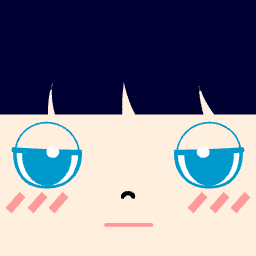 Square uploadShown on Discord
After you upload, Discord lets you crop and center the picture. Cropping in further throws away pixels, so it is better to crop the square yourself first and apply Discord's crop as it starts.
Discord PFP Size for Pixel Art
Pixel art is the exception to "upload it as it is". Pixel tools save small files, often 48 or 96 pixels, so enlarge the picture yourself to about 480 or 512 pixels before uploading. The blurry pixel art pfp fix shows how to keep the blocks sharp, and pixel art character size explains why the files start so small.
How to Make a Discord-Ready Square Avatar
- Build the picture on a square canvas. The Square PFP Maker saves a 256 by 256 PNG called square.png.
- Check the crop. Drop the PNG into the checker on the Square PFP Maker page to see it as a square, as a circle and at 128, 64 and 32 pixels.
- Bring it to 512. A 256 pixel cartoon can go up to 512 with hard-edge scaling at exactly two times, so the lines stay crisp. A photo should start from the original, not from a screenshot.
- Save as PNG and keep the file under 8 MB.
- Upload it in your Discord profile settings, then look at it both in a chat and in your profile card.
A file can be the right size and still be hard to read in a 32 pixel circle; what makes a good pfp lists what to change in the design.
Discord Banner Size
The banner is the wide image at the top of your profile card. Only Nitro members can upload one. Discord's Custom Profiles article asks for a PNG, JPG or animated GIF under 10 MB, with minimum dimensions of 680 by 240 pixels; the Per-Server Profiles article gives 600 by 240 as the recommended minimum. Use at least 680 by 240 to meet both.
FAQ
What are the recommended sizes for Discord PFPs?
Discord's own advice is about 200 by 200 pixels at minimum. A square of 512 by 512 pixels covers every size Discord shows your avatar at, on desktop and on phones, and stays far below the file size limit.
How do I resize or enlarge an image for a Discord avatar?
Crop it to a square in any image editor, then change the image size to 512 by 512 pixels. For photos, use the editor's normal smooth resizing; a small photo cannot gain detail, so start from the largest original you have. For cartoons and pixel art, choose nearest neighbor or hard edges and scale by a whole number, such as two or four times.
Can my Discord avatar be a GIF?
Animated avatars need Nitro. Without Nitro, upload a PNG or JPG.
Discord avatar size, in short
Upload a square PNG of 512 by 512 pixels, keep the face away from the corners so the circle crop does not cut it, and enlarge pixel art with hard edges before you upload. Build and check a square avatar in the Square PFP Maker, then upload it once at the right size.