Square Face Cube Generator

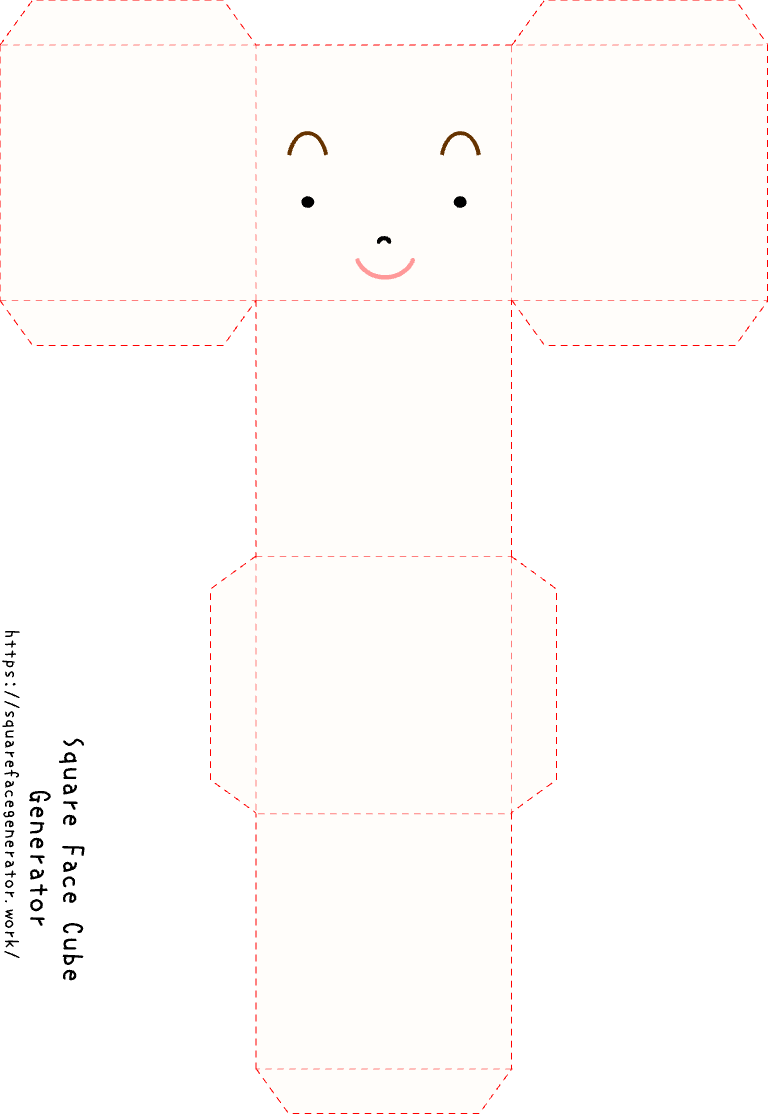
Turn your square face avatar into a printable 3D paper cube. Free, browser-based, no signup — just design, print, fold, and display.

START を押してゲーム内で開始

CLICK TO START

Free Square Face Cube Generator — Make a Printable Paper Cube from Your Avatar

The square face cube generator is a Flash classic that turns your custom cartoon avatar into a printable papercraft template — a flat sheet you can cut out and fold into a real, physical paper cube. Unlike most avatar tools that stop at a digital download, this one hands you something you can actually hold. Click START, customize your square face character, print the template, fold the tabs, and you've got a palm-sized 3D paper toy sitting on your desk.

This tool is preserved from the Flashpoint archive and runs in modern browsers via Ruffle — no Flash plugin needed, no download, no account. The cube template prints on a standard sheet of paper and requires only scissors, a little patience, and some tape or glue. It's the same creative experience from the original Flash era, now accessible in any up-to-date browser.

The square face cube generator sits at a satisfying intersection of digital design and physical craft. You're not just making a profile picture — you're making a miniature object that exists in the real world. That tactile result is what sets it apart from every other avatar generator: your character gets a body, volume, and a place on your shelf.

  • Design a square face character, then print the cube template and fold it into a real 3D paper toy
  • Free and browser-based — no account, no plugin, no software to install
  • Runs via Ruffle: the original Flash tool preserved for modern browsers
  • Print on any standard home or office printer — no special paper required
  • Ideal for desk toys, gifts, classroom crafts, party decorations, and more
  • Unlimited use — generate and print as many square face cubes as you like

Real Physical Output

Unlike digital-only avatar tools, the square face cube generator produces a printable template you fold into an actual 3D paper object

Completely Free, No Signup

Design and print as many square face cube templates as you want — no account, no payment, no watermarks, ever

Works in Any Modern Browser

Runs via Ruffle on Chrome, Firefox, Safari, and Edge — desktop or mobile, no plugin or app required

Prints on Standard Paper

No special equipment needed — any home or office printer and a regular sheet of paper is all it takes to get a finished cube

Preserved Flash Classic

An original Flashpoint-era tool, kept alive through Ruffle so the full creative experience is available in modern browsers

Endlessly Customisable Characters

Adjust skin tone, hair, eyes, accessories, and expression to build a square face cube that looks exactly the way you want

Ways People Use the Square Face Cube Generator

Desk Toys and Office Decor

Print and fold a square face cube of yourself, a colleague, or a character you love, then display it on your desk. Small, lightweight, and completely free to make — it's the kind of personalised object that sparks conversation and adds personality to a workspace.

Unique Handmade Gifts

A paper cube designed to look like the recipient is a surprisingly thoughtful gift. Use the square face cube generator to build a mini version of a friend, family member, or partner, print it on card stock, fold it up, and give something genuinely one-of-a-kind.

Classroom Crafts and Art Projects

Teachers and students love the square face cube generator for art class and maker projects. Kids design their own character, learn basic papercraft folding, and walk away with a finished 3D object they made themselves — a great hands-on activity for all ages.

Party Decorations and Favors

Make a table full of paper cubes for a birthday party, game night, or themed event. The square face cube generator lets you create matching characters quickly, and printed cubes make charming, low-cost decorations or take-home party favors guests can assemble themselves.

Office Fun and Team Building

Create mini paper cube versions of your team members for a meeting icebreaker or remote-work care package. The square face cube format is endlessly customisable — different hair, accessories, and expressions mean no two cubes look the same.

Creative Projects and Fan Crafts

Fan artists, papercraft collectors, and creative hobbyists use the square face cube generator as a starting point for larger projects — custom character merch, miniature dioramas, or paper toy series. The tactile result gives digital creativity a physical form.

使い方

  1. Launch the Square Face Cube Generator
  2. Design Your Square Face Character
  3. Export the Printable Cube Template
  4. Cut Out and Fold Your Paper Cube
  5. Display, Gift, or Share Your Creation

よくある質問

Q1. What is the square face cube generator?

The square face cube generator is a browser-based Flash tool (running via Ruffle) that lets you design a cartoon avatar with a square face shape, then outputs a printable papercraft template. You print the flat template, cut it out, and fold it into a real 3D paper cube you can hold and display.

Q2. How do I use the square face cube generator?

Click START to launch the editor, customise your square face character — skin tone, hair, eyes, accessories — then use the print or export option to get your cube template. Print on a standard sheet of paper, cut along the outline, fold on the marked lines, and secure the tabs with tape or a small amount of glue.

Q3. Is this tool really free?

Yes, completely free. There are no hidden fees, no premium tiers, and no watermarks on the printed template. You can generate and print as many square face cubes as you like at no cost.

Q4. Do I need a special printer or paper?

No. Any standard home or office printer works fine. Regular printer paper produces a lightweight cube; if you want something sturdier, print on card stock. No specialist materials are required.

Q5. Why does the square face cube generator use Flash / Ruffle?

This is an original Flash tool preserved from the Flashpoint archive. Adobe Flash was discontinued in 2020, but Ruffle — an open-source Flash emulator — lets the tool run in modern browsers without any plugin. You get the authentic original experience, browser-native.

Q6. How is a paper cube different from a regular avatar?

A regular avatar is a flat digital image. The square face cube generator goes a step further: it turns your character into a printable 3D template. Once folded, you have a physical paper toy — something with volume and presence that you can put on a shelf, desk, or give as a gift.

Q7. Can kids use the square face cube generator?

Yes, it's a great activity for children. Designing the character on screen is intuitive and fun, and the folding step is a satisfying hands-on craft activity. Younger children may need help with scissors and tabs, but the overall project is age-appropriate for most primary school ages and up.

Q8. Does it work on mobile?

The square face cube generator runs via Ruffle in mobile browsers, so you can design your character on a phone or tablet. For printing the template, you'll need a printer — either connect directly or send the file to a desktop machine.

Q9. Can I use the cube for commercial or gift purposes?

Yes. Cubes you create here are yours to use however you like — personal display, gifts, event decorations, classroom projects, or any other purpose. There are no licensing restrictions on designs you generate yourself.

Q10. The tool isn't loading — what should I do?

Try refreshing the page first. If the square face cube generator still doesn't load, make sure your browser is up to date — Ruffle requires a relatively recent version. Disabling ad blockers or script-blocking browser extensions can also help, as they sometimes interfere with the Ruffle loader.

Build Your Square Face Cube Now

Design your character, print the template, and fold it into a real 3D paper cube — free, no signup, ready in minutes.

Start Creating

その他のアイコンジェネレーター