Chibit Generator
Generate a full-body chibi character avatar — complete with outfit, pose, and accessories. Free online chibit generator, no signup needed.
CLICK TO START
Free Chibit Generator — Create Full-Body Chibi Characters Online
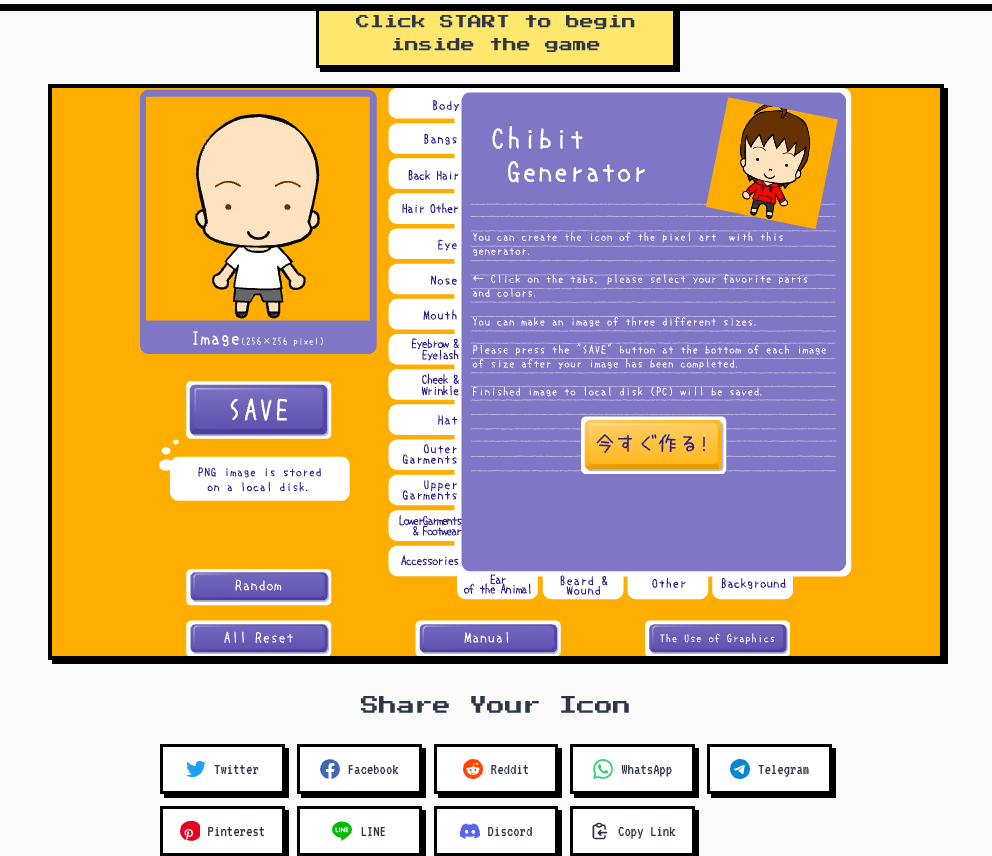
Most avatar tools stop at the face. The chibit generator goes further — it creates a complete, full-body chibi character with a head, outfit, pose, and accessories all in one 256px image. If you've been looking for a chibit generator that produces a real character instead of a cropped portrait, this is it. Click START, customize your chibi, and download a transparent PNG in minutes — no account required.
This tool is a preserved Flash classic, rescued from the Flashpoint archive and now running in any modern browser via Ruffle. It behaves exactly like the original: the same controls, the same art style, the same nostalgic chibi charm — just without the Flash plugin. It's the most faithful way to experience this generator today, and it's completely free.
Chibi (also called super-deformed) characters are defined by their oversized heads and compact bodies, giving them an instantly expressive and endearing look. The chibit generator leans into that style fully — the resulting character has the classic large-head-to-small-body ratio that makes chibi art so distinctive. Whether you need a Discord avatar, an RPG portrait, or a streaming overlay mascot, a chibi character reads immediately across any platform.
- Generates a complete full-body chibi character — head, torso, outfit, and accessories — not just a face
- Outputs a 256px transparent PNG with the classic chibi head-to-body ratio
- Fully customizable: skin tone, hair, eyes, clothing, and poses
- Runs via Ruffle — the original Flash chibit generator experience, preserved for modern browsers
- Free to use with no login, no watermarks, and no download limits
- Works on desktop and mobile browsers, instantly
Full-Body Character, Not Just a Face
The chibit generator creates a complete chibi with outfit, pose, and accessories — a real character, not a portrait crop
Classic Chibi Proportions
Authentic super-deformed style with the oversized head and compact body ratio that defines chibi character art
256px Transparent PNG Output
Downloads at 256px with a transparent background, ready for Discord, overlays, emotes, and social media uploads
Completely Free, No Account
No signup, no payment, no watermarks — generate as many chibit characters as you want at zero cost
Preserved Flash Classic via Ruffle
The original chibit generator tool, faithfully emulated in modern browsers through the Ruffle Flash runtime
Works on Any Device
Open the chibit generator on desktop, tablet, or phone — no plugin or app required, just a modern browser
Where People Use Chibit Generator Characters
Discord Avatars and Server Profiles
A full-body chibi character makes your Discord profile stand out. The compact 256px format fits perfectly in Discord's avatar circle, and the transparent PNG background means the character looks sharp on any server theme — light or dark.
Gaming Profile Pictures
Chibi characters have long been a staple of gaming culture. Use the chibit generator to create a personal mascot for your Steam profile, game forum signature, or clan page — a character that represents you across every game you play.
Streaming Overlays and Channel Branding
Streamers on Twitch and YouTubers use chibi characters as on-screen mascots, reaction images, and channel icons. Because the chibit generator outputs a full-body character with a transparent background, it drops straight into OBS or Streamlabs as an overlay element.
RPG and Tabletop Character Portraits
Tabletop RPG players often need quick character portraits for virtual tabletops like Roll20 or Foundry VTT. The chibit generator's full-body chibi style is a natural fit — it communicates character personality without requiring custom illustration.
Social Media and Fan Art Projects
Share your chibit character on Twitter/X, Instagram, or TikTok as a cartoon stand-in for your real identity. Fan artists also use chibi characters to represent themselves in collab projects, trading card sets, and community events.
Stickers, Emotes, and Chat Reactions
The expressive, compact chibi format translates well into Discord emotes and Telegram stickers. Generate a chibit, crop around the character, and you have a custom emote ready to upload — no drawing skill needed.
使用方法
- Launch the Chibit Generator
- Set Your Character's Base
- Customize Hair, Eyes, and Face
- Dress and Accessorize Your Chibit
- Download Your Chibit Character
常见问题
Q1. What is a chibit generator?
A chibit generator is a tool for creating chibi-style character avatars — cartoon figures with large heads and small, compact bodies. Unlike face-only avatar makers, the chibit generator produces a full-body character complete with clothing, hair, accessories, and pose. The term 'chibit' refers to this specific type of full-body chibi character output.
Q2. How is the chibit generator different from a face icon generator?
Face icon generators produce a cropped portrait showing only the head and maybe shoulders. The chibit generator creates a complete character from head to toe — you see the full outfit, the body proportions, and the overall chibi silhouette. If you want a character rather than a portrait, the chibit generator is the right tool.
Q3. How do I use the chibit generator?
Click the START button at the top of this page to launch the editor. Use the customization panel to adjust your chibi's skin tone, hair, eyes, outfit, and other options. When you're happy with the character, save it as a PNG. No account or plugin is needed — the tool runs in your browser via Ruffle.
Q4. Is the chibit generator free?
Yes, completely free. There are no premium tiers, no subscription fees, and no watermarks added to your downloads. You can create and download as many chibit characters as you like without spending anything.
Q5. What size is the chibit character output?
The chibit generator outputs your character at 256px. The image uses a transparent PNG background, so the character appears cleanly on any background color — ideal for Discord avatars, streaming overlays, and social media profile pictures.
Q6. Can I use my chibit character for commercial purposes?
Yes. Characters you generate with this tool are yours to use however you need — personal profiles, YouTube channels, merchandise, commercial branding, or any other purpose. No attribution required.
Q7. Why does this chibit generator use Flash / Ruffle?
This tool is a preserved Flash classic originally created before Adobe Flash was discontinued in 2020. Rather than letting it disappear, it's been archived and made accessible through Ruffle, an open-source Flash emulator that runs Flash content natively in modern browsers. No plugin needed — Ruffle handles everything automatically.
Q8. Does the chibit generator work on mobile?
Yes. The chibit generator runs via Ruffle in mobile browsers on both iOS and Android. Open the page in Chrome or Safari on your phone or tablet, tap START, and start customizing. No app download is required.
Q9. How is a chibi character different from a regular cartoon avatar?
Chibi — also known as super-deformed or SD style — refers specifically to characters with exaggerated proportions: a very large head (often 1/2 to 1/3 of the total character height) and a small, simplified body. This gives chibi characters their distinctive cute, expressive quality. The chibit generator is built around this style, so every character it produces has authentic chibi proportions.
Q10. The chibit generator isn't loading — what should I do?
Try refreshing the page first. If the tool still doesn't appear, make sure your browser is up to date — Ruffle requires a recent version of Chrome, Firefox, Safari, or Edge. Also check if any browser extensions (ad blockers, script blockers) might be interfering, as these can sometimes prevent the Ruffle loader from initializing.
Build Your Free Chibit Character Now
Design a full-body chibi avatar with your own style — it's free, instant, and no account needed.
Start Creating